Contract Review Software: What to Look For Before You Buy
Comparing contract review software? This buyer's guide covers the 7 features that separate useful tools from expensive ones, with a full comparison table.
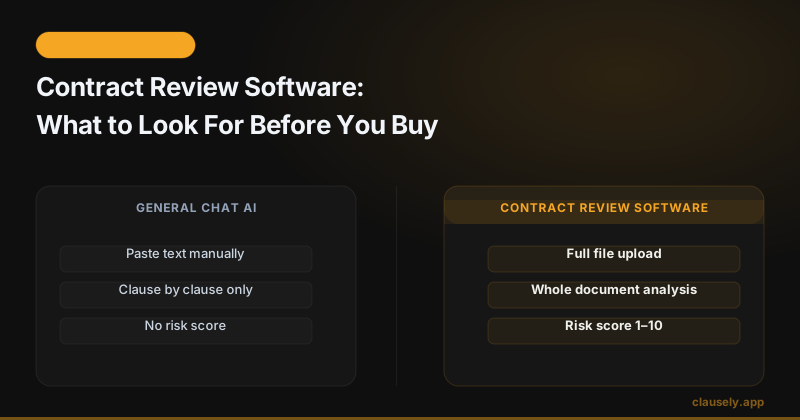
The contract review software market is full of tools making identical promises. All of them claim to use AI. All of them say they catch risky clauses. Most of them do not explain what they actually do, what they skip, or who they were built for.
Before you spend money on any of these tools, there is a set of specific features that separates software that genuinely protects you from software that checks a few boxes and calls it a review. This guide breaks down exactly what to look for, which categories of software serve which buyers, and what questions to ask before committing to anything.
According to Cornell Law's overview of contract law, a contract is legally binding once all essential elements are present. The problem is that most people sign contracts without knowing which of those elements protect them and which leave them exposed. Software that handles this well is genuinely useful. Software that does not is just expensive word processing.
The Core Feature Checklist
Start here. Before reading vendor marketing copy or watching a demo, run any tool you are considering against this table.
| Feature | Why It Matters | Red Flag If Missing |
|---|---|---|
| File upload support | Most contracts arrive as PDFs, scans, or photos. A tool that only accepts copy-paste forces you to do manual work before the review even starts. | If it does not accept PDF and image uploads, it is not ready for real-world use. |
| Full-document review | Contracts have clauses that conflict with or modify each other across sections. A tool that only reads in chunks misses those relationships. | Any tool marketed as "section-by-section" analysis cannot catch cross-document conflicts. |
| Clause detection | Good software identifies specific clause types: payment, termination, IP ownership, indemnity, auto-renewal, and more. | If the tool cannot name specific clauses, it is doing keyword matching, not contract analysis. |
| Missing protection checks | Risky clauses you can see. Missing protections you cannot. A tool that only flags what is present skips half the job. | No mention of missing clauses in the output means you only know what is there, not what is absent. |
| Plain-English explanation | There is a difference between rephrasing legal text and explaining what it means for your situation. You need the latter. | If the output reads like a paraphrase of the contract, the tool is not adding value. |
| Risk scoring or prioritization | Not every flagged clause is equally dangerous. Without a severity signal, you have to read everything and judge it yourself. | A flat list of issues with no priority order puts the burden back on you. |
| Data handling and privacy | Your contracts contain sensitive financial, employment, or business information. The tool must be explicit about how it stores and uses that data. | No privacy policy, no data retention policy, or vague "we may use your data" language is a hard stop. |
1. File Upload and Format Support
Most contracts do not arrive in a format that is easy to paste into a chat window. They arrive as PDFs from DocuSign, scanned images from a fax, photos taken with a phone, or Word documents with tracked changes. A contract review tool that cannot handle all of these is not built for real contracts.
The technical capability behind image and scan processing is called OCR, optical character recognition. OCR converts image-based text into readable characters that software can analyze. Without it, a tool is limited to documents where the text is already machine-readable. That rules out a significant portion of contracts people actually receive.
Tools that rely on paste-to-chat interfaces fail here in a specific way: they require you to select all the text, copy it, and paste it manually. That process drops formatting, merges paragraphs, removes table structure, and sometimes garbles clause numbering. The tool then reviews a corrupted version of your document without telling you.
Clausely accepts PDF uploads, image uploads including photos of printed contracts, and direct document uploads. The file goes in as-is. No pre-processing required.
2. Full-Document Review vs Section-by-Section
This distinction matters more than most buyers realize.
A contract is not a collection of independent clauses. Clause 4 might establish a payment structure that Clause 11 overrides under specific conditions. An indemnification provision in Section 7 might be limited by the liability cap buried in Section 14. A non-compete in Section 9 might be tied to the definition of "confidential information" in Section 2, and that definition might be narrower than it appears.
Section-by-section analysis reviews each part of the document in isolation. It catches individual clause problems. It misses relationships between clauses. It cannot detect when one clause silently modifies another three pages later.
Full-document review loads the entire contract before producing any output. The analysis can cross-reference terms, catch conflicts between sections, and identify when a clause that looks acceptable in isolation becomes dangerous in context.
This is one of the reasons how AI reads a contract line by line matters as a technical question, not just a marketing angle. The architecture of the tool determines what it can and cannot catch.
3. Clause Detection: What Good Coverage Looks Like
A serious contract review tool should detect and explain the following clause types at minimum. This is not an exhaustive list, but anything that cannot identify most of these is not equipped for standard commercial or employment contracts.
- Payment terms: When payment is due, late fees, currency, and what triggers the obligation
- Termination provisions: Who can end the agreement, under what conditions, and what notice is required
- Intellectual property ownership: Who owns work product, deliverables, or inventions created under the contract
- Indemnification: Who is responsible for costs if a third party brings a claim
- Auto-renewal clauses: Whether the contract renews automatically and what the opt-out window is
- Confidentiality and non-disclosure: What information is protected, for how long, and what exceptions apply
- Non-compete and non-solicitation: Geographic scope, duration, and enforceability signals
- Governing law and jurisdiction: Which state's law applies and where disputes must be filed
If a tool cannot identify and explain all of these, it is not doing contract review. It is doing keyword search with a summary layer on top.
4. Missing Protection Checks
This is where most contract review tools fail, and they fail quietly.
When a contract has a dangerous clause, you can see it. It shows up in the document. A tool that reads the document can flag it. That part is manageable.
When a contract is missing a protection you should have, there is nothing to flag. There is no text that says "this contract does not protect you from scope creep" or "this agreement has no liability cap." The absence of protection is invisible unless the tool is specifically built to check for what should be there.
Missing protection analysis requires the tool to carry a model of what a well-constructed contract looks like for a given contract type, then compare your document against that model. It is a materially harder problem than flagging a risky clause that exists in the text.
Common missing protections that cause real harm:
- No mutual termination right, so only one party can exit the agreement
- No payment dispute process, leaving you with no recourse if an invoice is rejected
- No limitation of liability, leaving you exposed to unlimited damages
- No dispute resolution clause, meaning litigation is the only option
- No intellectual property reversion clause, so you cannot reclaim your own work if the project ends
For a detailed breakdown of what to check for, see how to tell if a contract is missing key protections. The American Bar Association's Legal Technology Survey documents that even legal professionals miss missing-protection issues at high rates when reviewing contracts manually under time pressure.
5. Plain-English Explanations That Actually Help
There is a difference between summarizing legal text and explaining what it means for you.
Summarizing: "The indemnification clause requires Party A to defend and hold harmless Party B from any third-party claims arising from Party A's actions."
Explaining: "If someone sues the other party because of something you did, you have to pay their legal costs, even if you were not negligent. This is unusually broad. Most indemnification clauses are limited to claims caused by your own misconduct, not any claim that happens to relate to your work."
The summary restates what the clause says. The explanation tells you what it means for you and flags that it is unusual. The first is faster for the tool to produce. The second is what you actually need.
Ask any tool you are evaluating to show you sample output. If the explanation reads like a cleaned-up version of the original clause language, it is summarizing. If it contextualizes the clause, notes whether it is standard or unusual, and tells you what would happen if this clause were enforced, it is explaining.
Plain-English output that genuinely helps also includes negotiation suggestions. Not just "this clause is risky" but "here is alternative language you could propose."
6. Risk Scoring and Prioritization
Every serious contract review tool should produce a risk score. Not because a number tells you everything, but because it solves a specific problem: when a review returns fifteen flagged items, how do you know where to start?
A 1-10 risk score with clear anchors helps you triage. A score of 2 means "this is standard and worth noting." A score of 8 means "this is unusual, financially significant, and you should address it before signing." Without that signal, you have to read every flag and judge severity yourself, which is exactly the work the tool was supposed to do for you.
Good risk scoring also separates clause-level risk from document-level risk. A single high-severity clause can raise the overall document risk significantly. A document with fifteen low-severity flags might actually be relatively safe. The score should reflect both dimensions.
For a concrete example of how indemnification scoring works, see the Clausely glossary entry on indemnification. It shows why the same clause type can score a 3 in one context and an 8 in another depending on scope, limits, and who bears the cost.
The NIST AI Risk Management Framework provides useful grounding for evaluating how AI tools communicate risk to users. Consistent, calibrated risk communication is a design requirement, not a nice-to-have.
7. Who Each Tier of Software Is Actually Built For
Contract review software does not exist on a single spectrum from cheap to expensive. It exists in three distinct tiers, each built for a different buyer with different needs. Buying from the wrong tier wastes money or leaves you underserved.
| Tier | Tools | Price Range | Built For |
|---|---|---|---|
| Enterprise CLM | Ironclad, Juro, Concord | $10,000+/year | In-house legal teams, procurement departments, companies handling hundreds of contracts per month. Full contract lifecycle management: drafting, negotiation, execution, and storage. Overkill for anyone without a legal team. |
| Mid-market legal tools | LegalOn, Spellbook | $2,000+/year | Law firms and in-house counsel who need AI-assisted review integrated into their existing workflow. Requires legal expertise to interpret output. Not designed for non-lawyers. |
| Consumer and SMB | Clausely | Free to $149/year | Individuals, freelancers, small business owners, and anyone who needs to understand a contract before signing it. Output is designed to be understood without a law degree. |
The enterprise and mid-market tools assume you know what you are looking at and need AI to process faster. Consumer tools assume you need the AI to translate.
If you are an individual, a freelancer, or a small business owner, enterprise pricing is not the only thing that should disqualify those tools. The output format will not help you either. For a direct comparison of how purpose-built tools differ from general AI for contract review, see AI contract review vs ChatGPT.
Clausely sits in the consumer and SMB tier by design. Free plan includes 3 analyses. Starter Pack is $9.99 for 10 analyses that never expire. Pro is $24.99/month or $149/year for unlimited analyses. See the full Clausely pricing page for what each tier includes.
8. Questions to Ask Before You Buy
Run any contract review tool through these questions before committing.
- What file formats does it accept? PDF, DOCX, and image uploads are the minimum. Ask specifically about scanned PDFs and photos.
- Does it read the full document or process it in sections? Ask for a technical explanation, not a marketing answer.
- What specific clause types does it detect? Ask for the list. If they cannot give you a specific list, they cannot give you reliable detection.
- Does it check for missing protections, not just risky clauses that are present? This is a binary question. Either the feature exists or it does not.
- How does it explain what it finds? Ask for a sample output on a real contract. Read it and decide if you understand it.
- What is the risk scoring methodology? How are scores assigned? What does a 7 mean vs a 9? If they cannot explain the methodology, the scores are not reliable.
- Where is your data stored and how long is it retained? Get a specific answer. "We take security seriously" is not an answer.
- What is the cancellation and refund policy? Annual plans at $10,000+/year should have clear exit terms. Monthly plans should cancel without penalty.
FAQ
What is contract review software?
Contract review software analyzes a legal contract and identifies clauses that carry risk, protections that are missing, and terms that are unusual or one-sided. Better tools explain what each finding means in plain language and suggest how to respond. The goal is to help you understand what you are agreeing to before you sign.
Is contract review software a replacement for a lawyer?
No. Contract review software gives you a fast, structured analysis of a document. It helps you understand what a contract says and flags areas of concern. A lawyer provides legal advice specific to your situation, can negotiate on your behalf, and carries professional liability for their guidance. For high-stakes agreements, use the software to prepare your questions and use a lawyer to answer them.
How accurate is AI contract review software?
Accuracy varies significantly by tool and clause type. Purpose-built legal AI trained specifically on contracts performs better than general-purpose AI applied to contracts. The most reliable tools show you the exact clause text they are analyzing so you can verify the output yourself, rather than producing conclusions without citing the source. You should not accept any AI output without checking it against the original document.
What types of contracts can this software review?
Most consumer-tier tools handle the contracts individuals and small businesses encounter most often: NDAs, employment agreements, freelance contracts, lease agreements, service agreements, consulting agreements, and contractor agreements. Enterprise tools handle more complex instruments including M&A agreements, licensing deals, and multi-party commercial contracts. Always verify that a tool has been tested on the contract type you need reviewed before relying on it.
The Bottom Line
Contract review software ranges from expensive enterprise tools built for legal teams to affordable tools built for the contracts real people sign. The right tool is the one that reads your full document, explains what it finds in language you understand, checks for what is missing and not just what is present, and handles your data responsibly. Match the tool to the buyer it was built for, verify the feature list against the checklist above, and ask the right questions before paying.
Read the guide, then move into the real workflow, pricing, audience page, and glossary that support the next decision.
This article is for informational purposes only and does not constitute legal advice. For high-stakes agreements, consult a qualified attorney.
Got a contract to review?
Upload it and get full AI contract review in under a minute. Free.
Analyze My Contract