AI Contract Review for Small Businesses: A Plain-English Guide
How legal contract review software helps small businesses catch risky clauses, spot missing protections, and avoid costly mistakes before signing.
You just landed a new vendor. They send over a contract. Twelve pages of dense legal language, paragraphs full of defined terms that reference other defined terms, and a signature line waiting at the bottom. You do not have a lawyer on retainer. Your options are sign it and hope, pay $400 to $600 an hour to have someone review it, or find a better way.
That is exactly the situation legal contract review software is built for.
The short answer is this. AI contract review software reads the full document, flags the risky clauses, surfaces what is missing, and gives you a plain-English report you can actually act on. It does not replace a lawyer. It does replace blind signing.
Do Small Businesses Actually Need Legal Contract Review Software?
If you sign two or three contracts a year and they are all simple one-page agreements with people you know well, you might be fine without it. But most small businesses are not in that position.
Here is when the answer is clearly yes:
You sign more than two or three contracts per year. Vendor agreements, client service contracts, lease renewals, contractor agreements, software terms, even partnership side letters. These add up quickly once a business is operating.
You work with vendors or clients regularly. Every time you bring on a new vendor or take on a new client with their own paper, you are exposed to terms you did not write and may not fully understand.
You have no in-house counsel. According to the U.S. Small Business Administration, small businesses represent a significant share of commercial contract activity in the United States. Most of them are signing without legal review because the cost is prohibitive for routine agreements.
Contracts arrive in complex or unfamiliar formats. When a Fortune 500 company sends you their master services agreement, it is not written for your benefit. It is written by their legal team to protect them.
Legal contract review software does not eliminate risk. It makes the risk visible so you can decide what to do about it before you sign. That is the entire value.
What Types of Contracts Come Up Most for Small Businesses?
Small businesses sign a wide variety of agreements. The most common ones that come through legal contract review software are:
Vendor agreements. Software subscriptions, supply contracts, service provider terms. These almost always contain auto-renewal clauses, price change provisions, and liability limitations that favor the vendor. See our breakdown of the most common vendor agreement red flags before you sign your next one.
Client service contracts. If you are selling services, your client may send their own paper instead of accepting yours. Their version likely has payment terms you would not choose, IP assignment language that is broader than you intend, and termination rights weighted in their favor.
NDAs. Non-disclosure agreements look simple but carry real risk if the mutual obligations are not balanced, the definition of confidential information is too broad, or the duration is unlimited.
Commercial leases. Long documents with long terms. Personal guarantee clauses, maintenance obligation assignments, and lease renewal terms are where small business owners often get surprised years after signing.
Software and SaaS terms. Every tool your business uses has terms of service. Most people click through them. The ones that matter most contain data ownership language, auto-renewal terms, and liability limitations worth knowing.
Employment offers and contractor agreements. Who owns the work product? What is the non-compete scope? What is the notice period? These questions matter from the first document you exchange with anyone who works with or for you.
Partnership agreements. Decision-making rights, revenue splits, exit provisions, what happens if a partner wants out. Not having these in writing is the highest-risk scenario of all.
What Does Legal Contract Review Software Actually Do?
The process is straightforward, though the underlying analysis is not.
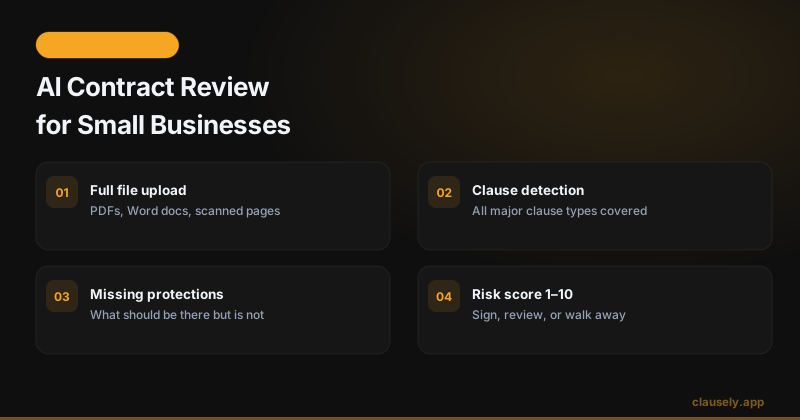
Step one: upload the file. You upload a PDF or Word document directly. No copying and pasting paragraphs into a chat window. The software reads the full contract, not just the sections you remember to ask about.
Step two: full-document read. The system processes every clause, cross-references defined terms, and builds a complete picture of the agreement. This is where AI does work that would take a paralegal hours to do manually.
Step three: clause detection. The software identifies the clauses present in the document and maps them to standard contract categories: payment terms, termination rights, IP ownership, liability limits, indemnification, dispute resolution, confidentiality, and more.
Step four: risk flagging. Clauses that create elevated risk are flagged and explained. Not just "this clause exists" but "this clause means you could be liable for their attorney fees in any dispute, with no cap."
Step five: missing protection check. This is often more valuable than the risk flags. The software identifies what is not in the contract that should be. No dispute resolution process. No liability cap. No data return provision on termination. Missing clauses are invisible unless you know to look for them.
Step six: plain-English explanation. Every flag comes with an explanation in plain language, not legalese. You understand what the clause means, why it matters, and what a less risky version would look like.
Step seven: risk score. The analysis produces a risk score from 1 to 10 so you can quickly understand whether this is a routine contract with minor flags or something that needs serious attention before you sign.
Step eight: act on the results. You now have the information to make a decision. Sign as-is, go back to the other party with specific asks, bring in a lawyer for the flagged sections, or walk away. See our detailed walkthrough of how AI reads a contract line by line for more on how this works under the hood.
What Are the Biggest Risks Small Businesses Face in Contracts?
Small business owners consistently run into the same set of dangerous clauses. Knowing what to look for is the starting point.
Auto-renewal traps. The contract renews automatically for another full term unless you cancel within a specific window, often 30 to 90 days before expiration. Miss the window and you are locked in for another year. The window is almost always buried.
One-sided termination rights. The other party can terminate with 30 days notice for any reason or no reason. You can only terminate for cause after a lengthy cure period. That asymmetry matters when the relationship goes sideways.
Vague payment approval language. "Payment subject to client approval" with no defined timeline, no escalation process, and no deemed-approval provision means invoices can sit unpaid indefinitely without the client technically being in breach.
Broad IP assignment. "All work product created in connection with this agreement" assigned to the client can include tools, templates, and code you use across multiple clients if the language is not scoped carefully.
No liability cap. If the contract does not cap your liability at a defined amount, typically the fees paid in the prior 12 months, your exposure in a dispute could be unlimited. Most sophisticated vendors cap their own liability while leaving yours uncapped.
Overbroad non-compete. A non-compete in a vendor or contractor agreement that prevents you from working with anyone in your industry for two years is not a standard protection. It is a trap.
Our breakdown of the seven clauses to check before signing any contract covers each of these in detail with examples of what a fairer version looks like.
How Much Does Legal Contract Review Software Cost for Small Businesses?
The contract review software market spans several tiers, and most of the options you will find first are not built for small businesses.
Enterprise CLM platforms. Tools like Ironclad, Sirion, and Juro are designed for legal and procurement teams at mid-to-large companies. Pricing starts at $10,000 per year and goes up significantly. They include workflow automation, approval routing, and integrations with tools most small businesses do not use. Not relevant for a 10-person company.
Mid-market tools. Some tools originally built for law firms or larger legal departments have released SMB plans. These typically run $2,000 or more per year and still carry more complexity than a small business needs.
Consumer and SMB tier. This is where tools like Clausely live. Clausely is built specifically for individuals and small businesses who need clear answers without a law degree or a legal operations team.
Clausely's pricing is straightforward:
- Free plan: 3 contract analyses at no cost. No credit card required. Good for occasional use or to test the output quality before committing.
- Starter Pack: $9.99 for 10 analyses. These credits never expire, so they work well for small businesses that sign contracts infrequently but want coverage when they do.
- Pro plan: $24.99 per month or $149 per year for unlimited analyses. The annual plan works out to $12.42 per month. Right for businesses that sign contracts regularly.
Compare the cost of a single lawyer review ($400 to $600 for a simple agreement) against a full year of unlimited AI contract review at $149. The math is straightforward for any business signing more than a few contracts per year.
That said, Clausely surfaces the risk. A lawyer advises you on what to do about it. Those are different services, and both can be worth having depending on what you are signing. See the next section for when you need which.
Can AI Contract Review Software Replace a Lawyer for Small Businesses?
No. And any tool that claims otherwise is overstating its value.
What AI contract review software replaces is blind signing. It replaces the scenario where a small business owner reads through a contract, does not know what to look for, misses three risky clauses, and signs because the other party says "this is our standard agreement."
That is a low bar, and clearing it has real value.
Here is a practical breakdown of when AI review is sufficient on its own and when you need a lawyer:
AI review is enough for:
- Standard vendor contracts for software, services, or supplies where the stakes are modest and the terms are fairly routine.
- NDAs that follow a standard bilateral structure with no unusual carve-outs.
- Freelance and contractor agreements where you have a clear sense of what should be in them.
- Lease renewals for the same space on similar terms.
- Client service contracts where you are using your own paper and just want a second set of eyes on it.
Bring in a lawyer when:
- The contract involves commercial real estate, especially a new lease with a personal guarantee.
- You are signing anything related to equity, financing, or investment.
- The other party has made significant modifications to standard terms and you need advice on what they are asking for.
- Your personal liability is on the line, not just your business.
- The other party's lawyers are clearly involved in drafting.
The American Bar Association has a helpful resource on knowing when to consult a lawyer that is worth reading if you are uncertain about where a specific contract falls.
The practical workflow for many small businesses: use AI review to understand what is in the contract, then decide whether the findings warrant the cost of a lawyer. Most of the time, the AI review surfaces manageable issues you can address yourself. Occasionally, it surfaces something serious enough to justify getting a lawyer involved. That is a much better outcome than signing without looking at all.
What Should a Small Business Look For in Contract Review Software?
Not all tools in this space are built the same way. Here is what to evaluate:
Full-document upload, not paste-and-chat. Some tools ask you to paste sections of a contract into a general-purpose chat interface. That means you decide what to include, which defeats the purpose. You want a tool that reads the entire document.
Clause detection across all major clause types. Payment terms, termination, IP, liability, indemnification, confidentiality, dispute resolution, auto-renewal, non-compete, data handling. A tool that only checks a few categories will miss things.
Missing protection detection. Flagging what is present is half the job. The other half is identifying what is absent. No liability cap? No dispute process? No data return on termination? These are often the most important findings.
Plain-English output. The analysis needs to be readable by a non-lawyer. If the output just restates the clause in different legal language, it has not done anything useful.
Pricing that matches your actual volume. A small business signing 6 contracts a year does not need an unlimited plan. One signing 40 does. Look for pricing that lets you pay for what you use.
The National Institute of Standards and Technology's AI Risk Management Framework provides useful context on how to evaluate AI tools in high-stakes contexts. For contract review, the core questions are accuracy, transparency in how conclusions are reached, and clear communication of what the tool can and cannot do.
Also worth checking: does the tool tell you when it is uncertain? A tool that flags every clause as high risk is not useful. Neither is one that flags nothing. You want calibrated outputs that distinguish between serious issues and standard boilerplate.
A Quick Example: Vendor Contract Review
Here is what actually happens when a small business owner uploads a vendor contract to Clausely.
The document is a six-page service agreement from a marketing agency. Standard cover page, definitions section, scope of services, fees, term and termination, IP, liability, and general provisions.
Upload: The PDF goes in. No formatting required.
OCR if needed: If the document was scanned rather than digitally created, the system runs optical character recognition to make the text machine-readable before analysis begins.
Clause identification: The system identifies the key clause types present in the document. In this case: monthly retainer fees with a net-30 payment term, a 12-month initial term with auto-renewal, a termination for convenience clause requiring 60 days notice by either party, IP assignment of all deliverables to the client, and a mutual confidentiality provision.
Flags raised: Two significant flags appear.
First: the payment terms include "subject to client approval of deliverables" with no defined approval timeline and no deemed-approval provision. This means the agency can withhold payment indefinitely by claiming deliverables are not approved, with no obligation to provide feedback within any specific timeframe.
Second: there is no liability cap. The agency's liability for any claim is unlimited. Given that this is a marketing services contract, the practical risk is lower than in a software or construction contract, but it is still a flag worth noting.
Missing protections noted: The contract has no defined dispute resolution process. If a disagreement arises, the only path is litigation. A simple mediation-first clause would significantly reduce the cost and time involved in resolving disputes.
Risk score returned: 5 out of 10. The contract is not alarming, but it has enough open-ended language to warrant a conversation before signing.
Plain-English summary: The business owner gets a clear explanation of each finding, what it means in practice, and what to ask the agency to change. In this case: add a 10-business-day deemed-approval provision on deliverables, add a liability cap equal to fees paid in the prior 12 months, and add a mediation clause before litigation.
Three specific asks, based on three specific findings, in plain language. That is the outcome. The business owner goes back to the agency with targeted feedback instead of signing blind or paying $500 for a lawyer to tell them the same things.
FAQ
Do small businesses need contract review software?
If you sign more than two or three contracts per year with vendors, clients, or partners, the answer is almost certainly yes. The cost of missing a single problematic clause, an auto-renewal that locks you in for a year, an unlimited liability provision, or a broad IP assignment you did not intend, typically exceeds the cost of a full year of contract review software. The free plan at Clausely lets you try it with no upfront commitment.
What types of contracts does AI contract review cover?
Purpose-built legal AI handles the full range of commercial contracts: vendor agreements, client service contracts, NDAs, commercial leases, employment offers, contractor agreements, software terms, and partnership agreements. The analysis looks for the same categories of clauses across all of them: payment, termination, IP, liability, confidentiality, dispute resolution, auto-renewal, and non-compete provisions.
Is AI contract review accurate?
For detecting standard commercial clauses and known risk patterns, the accuracy of purpose-built legal AI is high. Where AI is weaker is in context that requires industry-specific knowledge, jurisdiction-specific legal advice, or judgment calls about negotiating strategy. AI review tells you what is in the contract and what the risks are. It does not tell you what is normal for your industry or what leverage you have in a specific negotiation. A lawyer provides that context. AI removes the baseline problem of not knowing what you are signing.
When should I still hire a lawyer?
Hire a lawyer when the stakes are high enough that getting it wrong could be catastrophic: commercial real estate with a personal guarantee, equity or financing agreements, heavily negotiated terms where the other side has lawyers involved, or any situation where your personal assets are on the line. For routine vendor contracts, standard NDAs, and freelance agreements with mostly standard terms, AI review followed by targeted negotiation is usually sufficient.
The Bottom Line
Small businesses sign contracts that are written by the other party's lawyers. That imbalance does not disappear, but it does not have to mean signing blind. Legal contract review software gives you the information to understand what you are agreeing to, flag what needs to change, and decide when to bring in a lawyer for the situations that genuinely require one. Start with a free analysis at clausely.app and see what your next contract actually says before you sign it. You can also explore how Clausely is built specifically for small business contract review.
Read the guide, then move into the real workflow, pricing, audience page, and glossary that support the next decision.
This article is for informational purposes only and does not constitute legal advice. For high-stakes agreements, consult a qualified attorney.
Got a contract to review?
Upload it and get full AI contract review in under a minute. Free.
Analyze My Contract